
Cost Calculation
MyBotBox automatically calculates costs for all workflow executions, providing transparent pricing based on AI model usage and execution charges. Understanding these costs helps you optimize workflows and manage your budget effectively.
How Costs Are Calculated
Every workflow execution includes two cost components:
Base Execution Charge: $0.001 per execution
AI Model Usage: Variable cost based on token consumption
modelCost = (inputTokens × inputPrice + outputTokens × outputPrice) / 1,000,000
totalCost = baseExecutionCharge + modelCost
AI model prices are per million tokens. The calculation divides by 1,000,000 to get the actual cost. Workflows without AI blocks only incur the base execution charge.
Model Breakdown in Logs
For workflows using AI blocks, you can view detailed cost information in the logs:
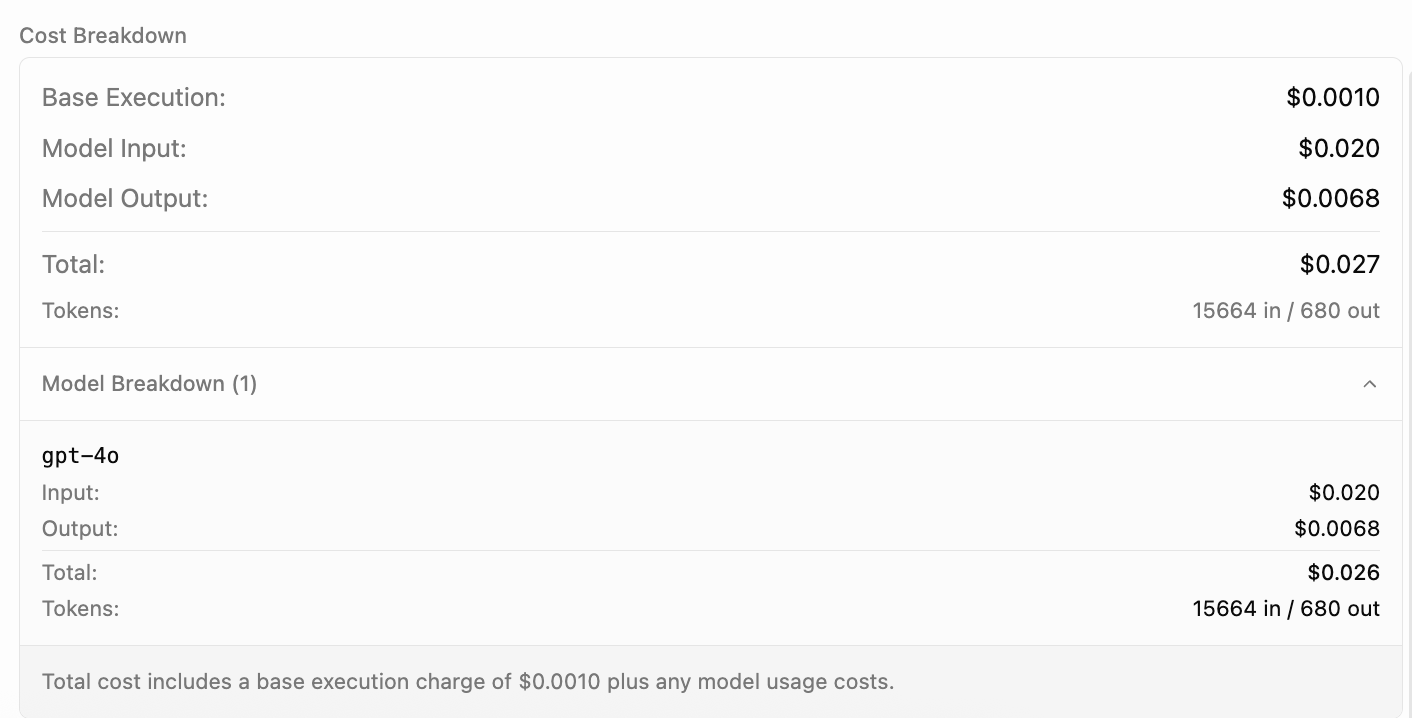
The model breakdown shows:
- Token Usage: Input and output token counts for each model
- Cost Breakdown: Individual costs per model and operation
- Model Distribution: Which models were used and how many times
- Total Cost: Aggregate cost for the entire workflow execution
Pricing Options
Hosted Models - MyBotBox provides API keys with a 2.5x pricing multiplier:
| Model | Base Price (Input/Output) | Hosted Price (Input/Output) |
|---|---|---|
| GPT-4o | $2.50 / $10.00 | $6.25 / $25.00 |
| GPT-4.1 | $2.00 / $8.00 | $5.00 / $20.00 |
| o1 | $15.00 / $60.00 | $37.50 / $150.00 |
| o3 | $2.00 / $8.00 | $5.00 / $20.00 |
| Claude 3.5 Sonnet | $3.00 / $15.00 | $7.50 / $37.50 |
| Claude Opus 4.0 | $15.00 / $75.00 | $37.50 / $187.50 |
The 2.5x multiplier covers infrastructure and API management costs.
Your Own API Keys - Use any model at base pricing:
| Provider | Models | Input / Output |
|---|---|---|
| Gemini 2.5 | $0.15 / $0.60 | |
| Deepseek | V3, R1 | $0.75 / $1.00 |
| xAI | Grok 4, Grok 3 | $5.00 / $25.00 |
| Groq | Llama 4 Scout | $0.40 / $0.60 |
| Cerebras | Llama 3.3 70B | $0.94 / $0.94 |
| Ollama | Local models | Free |
Pay providers directly with no markup
Pricing shown reflects rates as of September 10, 2025. Check provider documentation for current pricing.
Cost Optimization Strategies
Usage Monitoring
Three workspace pages cover usage and billing:
- Usage (
/workspace/<id>/usage): per-execution log with date-range filters (1d, 7d, 30d, MTD, Last month) and CSV export. - Billing & Invoices (
/workspace/<id>/billing): plan summary, payment method (managed in Stripe), Included + On-Demand usage breakdown, live invoice list. - Spending (
/workspace/<id>/spending): current plan, upgrade options, included-usage progress, on-demand spend, and a Monthly Limit control (Fixed amount or Unlimited).
Programmatic Usage Tracking
You can query your current usage and limits programmatically using the API:
Endpoint:
GET /api/users/me/usage-limitsAuthentication:
- Include your API key in the
X-API-Keyheader
Example Request:
curl -X GET -H "X-API-Key: YOUR_API_KEY" -H "Content-Type: application/json" https://api.mybotbox.com/api/users/me/usage-limitsExample Response:
{
  "success": true,
  "rateLimit": {
    "sync": { "isLimited": false, "limit": 10, "remaining": 10, "resetAt": "2025-09-08T22:51:55.999Z" },
    "async": { "isLimited": false, "limit": 50, "remaining": 50, "resetAt": "2025-09-08T22:51:56.155Z" },
    "authType": "api"
  },
  "usage": {
    "currentPeriodCost": 12.34,
    "limit": 100,
    "plan": "pro"
  }
}
Response Fields:
currentPeriodCostreflects usage in the current billing periodlimitis derived from individual limits (Free/Pro) or pooled organization limits (Team/Enterprise)planis the highest-priority active plan associated with your user
Plan Limits
Each plan has a subscription price (what Stripe charges monthly) and an included usage cap (the dollar value of API calls bundled in before On-Demand kicks in).
| Plan | Price | Monthly Usage Limit | Rate Limits (req/min) |
|---|---|---|---|
| Free | $0 | $10 | 5 sync, 10 async |
| Starter | $29/mo | $20 | 10 sync, 50 async |
| Pro | $79/mo | $20 (raise via Monthly Limit) | 50 sync, 100 async |
| Enterprise | $199/mo | $200 default, custom on request | Custom |
Subscription prices are configured via STRIPE_<PLAN>_PRICE_ID* env vars.
Included usage caps come from apps/sat/lib/billing/constants.ts:8-15 and
are env-overridable. Once a workspace's monthly usage exceeds its plan's
cap, additional usage falls into On-Demand and is billed in arrears
(see Threshold Billing below).
Billing Model
MyBotBox uses a base subscription + overage billing model:
How It Works
Starter ($29/mo):
- Subscription includes $20 of usage
- Usage over $20 → On-Demand, billed at the next threshold or month end
- Example: $35 usage = $29 (subscription) + $15 (On-Demand)
Pro ($79/mo):
- Subscription includes $20 of usage by default; can be raised via the Monthly Limit control on the Spending page
- Higher rate limits and access to advanced agentic blocks
Enterprise ($199/mo):
- $200 of included usage by default; custom limits available
- SSO, audit logs, dedicated success manager, fixed monthly price
Threshold Billing
When unbilled overage reaches $50, MyBotBox automatically bills the full unbilled amount.
Example:
- Day 10: $70 overage → Bill $70 immediately
- Day 15: Additional $35 usage ($105 total) → Already billed, no action
- Day 20: Another $50 usage ($155 total, $85 unbilled) → Bill $85 immediately
This spreads large overage charges throughout the month instead of one large bill at period end.
Cost Management Best Practices
- Monitor Regularly: Check your usage dashboard frequently to avoid surprises
- Set Budgets: Use plan limits as guardrails for your spending
- Optimize Workflows: Review high-cost executions and optimize prompts or model selection
- Use Appropriate Models: Match model complexity to task requirements
- Batch Similar Tasks: Combine multiple requests when possible to reduce overhead
Next Steps
- See the Billing & Usage section for portal walkthroughs (Usage / Billing & Invoices / Spending) and the API reference for programmatic access.
- Learn about Logging to track execution details.
- Explore the External API for programmatic cost monitoring.
- Check out workflow optimization techniques to reduce costs.